iRacing Motion, Dashboards and Overlays | Sim Chief
Game: iRacing
iRacing motion, haptics, dashboards and overlays
Sim Chief reads iRacing's data and drives your whole rig from it: motion, bass shakers, wind, dashboards, overlays and lap analysis. Full support, free.
Diagram: iRacing to your rig
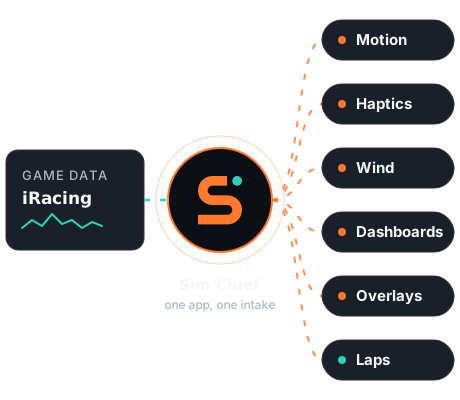
One connector, every effect
Sim Chief reads iRacing once and feeds everything from that one stream.
Motion
Seat movers and platforms from 2DOF to 6DOF.
Learn moreG-seats and G-belts
Pressure on your body through the whole braking zone and the whole corner.
Learn moreBass shakers
2, 4 or 7.1 channels from any audio output, plus SimVibe.
Learn moreWind
Fans that follow your speed.
Learn moreDashboards
Monitors, dash screens, your phone and LED boards.
Learn moreOverlays
A click-through window over the game.
Learn moreLaps
Every lap recorded, with personal bests. Sim Chief Pro adds coaching.
Learn moreFrom install to the grid
- Install Sim Chief. It finds iRacing in your library.
- Say yes once. Sim Chief checks iRacing's data output and sets it up, with a backup and an undo.
- Pick your devices. Sim Chief Studio shows what's connected and starts you on a preset.
- Drive. Your laps are recorded, and your dash and overlays read the same data.
Coming soon
- Sim Chief is coming soon. Join the beta to be first in.
Related pages
Questions people ask
Does Sim Chief have iRacing overlays?
Sim Chief draws a click-through overlay over iRacing, fed by the game's data.
Can I use an iRacing dashboard on my phone?
Yes. Pair your phone with a QR code and use the phone dash on your home network, or show the dash on a monitor, dash screen or LED board.
Does Sim Chief record iRacing telemetry?
Yes. Every lap is recorded with personal bests and the numbers for each corner. Coaching is part of Sim Chief Pro.
Does iRacing support cost extra?
No. Every game is free in Sim Chief.
Be first on the grid when the beta opens
Sim Chief is coming soon. Beta sign-up opens here soon. Free, like the app.
